Android版ChromeでGeminiが全米ユーザーに提供開始Tap into the power of Gemini in Chrome on Android.
匿名の公開いいねです。記事の保存・お気に入りではなく、Featured、Top 3、重要度、掲載順位には影響しません。仕組みとプライバシーAnonymous public likes are reactions, not saved articles or bookmarks. They do not affect Featured, Top 3, importance, or listing order.How it works and privacy
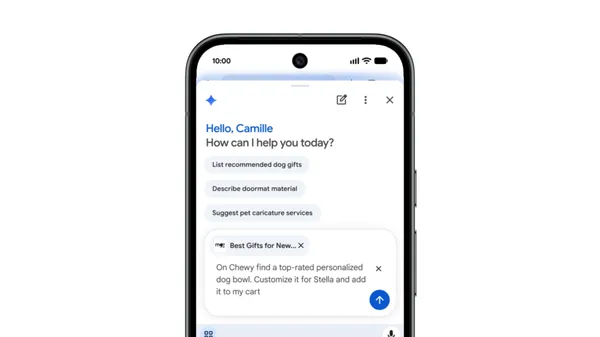
GoogleはAndroid版ChromeへのGemini統合を米国の全ユーザーに拡大し、ブラウジング中にAIアシスタントをより手軽に活用できるようになった。
- Google has expanded Gemini integration in Chrome for Android to all U.S.
- users, making AI-powered browsing assistance broadly accessible on mobile.
本ページの本文と要約は AI による自動生成です。日本語版と英語版は言語ごとに独立して生成されるため、表現や詳しさが異なる場合があります。正確性は元記事 (blog.google) をご確認ください。The body and summaries are AI-generated independently for each language, so wording and detail may differ. Verify accuracy at the original source (blog.google).
要約と収集メタデータに基づく AI 解説。元記事全文の転載・翻訳ではありません。AI explainer based on the summaries and collected metadata, not a copy or translation of the full source article.
Googleは、モバイル向けブラウザ「Android版Chrome」に統合したAIアシスタント「Gemini」を、米国の全ユーザーへ提供開始したと明らかにした。これまで段階的に広げてきた機能をより多くの利用者が使えるようになり、スマートフォンでのウェブ閲覧中にAIの支援を手軽に呼び出せる環境が整った形だ。
Gemini in Chromeは、ブラウジングの流れを離れずにAIアシスタントへ質問や指示を出せる仕組みとされる。閲覧中のページに関する内容を尋ねたり、情報の整理を手伝ってもらったりといった用途が想定され、別のアプリやタブに切り替える手間を減らせる点が特徴と見られる。デスクトップ環境で先行して提供されてきた同種の機能を、モバイルの主要な利用シーンであるAndroidへ本格的に展開する動きと位置づけられる。
背景には、GoogleがGeminiブランドのもとでAI機能を自社サービス全体へ広く組み込む戦略がある。同社はかつての「Bard」からGeminiへと生成AIの看板を切り替え、検索やAndroid、各種アプリへの統合を進めてきた。ブラウザは日々のインターネット利用の入り口であり、そこにアシスタントを直接埋め込むことは、AIを日常的な操作の一部として定着させるうえで重要な接点になり得る。
競合環境も無視できない。ブラウザとAIの融合という点では、MicrosoftがEdgeにCopilotを組み込むなど、各社が自社ブラウザへAIアシスタントを取り込む取り組みを強めている。こうした流れの中で、世界的に大きなシェアを持つChromeへのGemini統合がモバイルで広がることは、多くのユーザーがAI支援機能に触れる機会を増やす可能性がある。
一方で、今回発表されたのは米国のAndroidユーザーを対象とした提供拡大であり、他地域や他プラットフォームでの展開状況については、この情報からは断定できない。実際の使い勝手や対応する操作の範囲は、利用環境やページの種類によって異なる可能性もある。ウェブ閲覧という身近な行為にAIがどこまで自然に溶け込むかは、今後の利用者の反応や機能の改善によって明らかになっていくと見られる。
Google has begun rolling out Gemini in Chrome to all Android users in the United States, extending its AI assistant from the desktop browser to a much larger mobile audience. The move matters because Chrome is one of the most widely used mobile browsers, and placing Gemini directly inside it lowers the barrier to using AI while browsing, allowing users to ask questions, summarize pages, and get help without switching to a separate app.
The core idea is that Gemini becomes accessible within the browsing experience itself. Rather than copying a link or text into a standalone chatbot, users on Android can invoke the assistant while a page is open, drawing on the content in front of them for context. According to Google's description, the feature is now available to all Android users in the U.S., signaling a shift from limited or gated access to a broad, general rollout in that region.
This mobile expansion follows Google's earlier work bringing Gemini into Chrome on desktop, where the assistant was introduced to help users understand and act on what they are viewing. Extending the same capability to Android is a logical next step, given how much web activity now happens on phones. It also aligns Chrome more closely with the AI features Google has been weaving across its product line, from Search to Workspace, as the company positions Gemini as a consistent layer across its ecosystem rather than a single destination.
Gemini is Google's family of large language models, and its integration into Chrome is part of a broader industry pattern in which browsers are becoming entry points for AI assistance. Microsoft has pursued a similar strategy by embedding Copilot into its Edge browser and Windows, while a number of startups have built AI-centric browsers or extensions designed to summarize, search, and reason over web content. Placing an assistant inside the browser is attractive because the browser already knows what a user is looking at, which can make responses more relevant to the task at hand.
For users, the practical appeal is convenience. Common use cases for this kind of integration include summarizing long articles, clarifying unfamiliar terms, comparing information across pages, and drafting text based on what is on screen. On mobile, where screen space is limited and typing is slower, an assistant that can distill a page or answer a follow-up question may be especially useful. The exact set of capabilities available to Android users may vary, and Google has historically refined such features over time as they reach a wider audience.
It is worth noting the boundaries of this announcement. The rollout described here is specific to Android users in the United States, so availability in other countries or on other platforms is not implied by this update. Google frequently launches AI features on a regional basis first, often citing the need to meet local requirements and to gather feedback before expanding further. As a result, users outside the U.S. or on other operating systems would likely need to wait for separate announcements.
Prospective users should also keep general expectations in mind. Like other generative AI systems, Gemini can produce responses that are inaccurate or incomplete, so its summaries and answers are best treated as helpful starting points rather than authoritative conclusions. Privacy considerations are relevant as well, since browser-based assistants may process page content to generate responses; Google typically provides controls and documentation governing how such data is handled, and users who want details would need to consult the applicable settings and policies.
The broader context is a competitive race to make AI assistance ambient rather than something users seek out deliberately. By putting Gemini in Chrome on Android for a large U.S. audience, Google appears to be betting that convenience and reach will drive habitual use. Whether that translates into sustained engagement will depend on how reliably the assistant performs on everyday tasks and how it compares with rival offerings. For now, the expansion marks a meaningful step in bringing Google's AI assistant to mainstream mobile browsing, and it sets the stage for the feature to appear in additional markets over time.
ポコとTECHガイドPoko & TECH Guide
ポコと当サイトのTECHガイドが、記事の要約と収集した情報から読みどころを語るAI生成の対話です。Poko and TECH Dashboard's own TECH Guide discuss the article's highlights in an AI-generated conversation based on its summary and collected source details.
- ポコPokoAndroid版ChromeにGeminiを統合って、それって何?米国なら誰でも使えるようになったの?What does Gemini integration in Chrome for Android mean? Can anyone in the U.S. use it now?
- TECHガイドTECH Guide記事によれば、米国のAndroidユーザー全員が対象じゃよ。簡単に言うと、閲覧中にAIアシスタントを使いやすくなったんじゃ。According to the article, it’s now available to all Android users in the U.S. Put simply, the AI assistant is easier to access while browsing.
- ポコPokoそれって何がうれしいの?スマホでのブラウジング中に、AIの助けをもっと気軽に使えるってこと?What’s the benefit? Does it mean AI help is now more accessible while browsing on a phone?
- TECHガイドTECH Guideその理解でよいぞ。記事では、AIを使ったブラウジング支援がモバイルで広く利用可能になった、と説明しておる。That’s right. The article says AI-powered browsing assistance is now broadly accessible on mobile.
- ポコPokoなるほど!米国では、Android版Chromeを使う人みんなにGeminiが広がった、という話なんだね。Got it! So Gemini in Chrome for Android has rolled out to everyone in the U.S.
- TECHガイドTECH Guideそういうことじゃな。ただし今回の記事の対象は米国で、ほかの地域への提供については触れられていない点に注意じゃ。Exactly. Just note that this announcement covers the U.S.; the article doesn’t say when or whether availability will expand elsewhere.