新しいダッシュボード体験が標準にNew dashboard experience now the default
匿名の公開いいねです。記事の保存・お気に入りではなく、Featured、Top 3、重要度、掲載順位には影響しません。仕組みとプライバシーAnonymous public likes are reactions, not saved articles or bookmarks. They do not affect Featured, Top 3, importance, or listing order.How it works and privacy
- GitHubの新ダッシュボードが全ユーザーの標準表示となり、進行中のエージェントセッション、Issue、プルリクエストを一元化しました。
- 各一覧はフィルターで最大12件に調整でき、更新情報を別のFeedタブに分け、Copilotへの作業依頼も画面から始められるため、開発者が次の作業に集中できます。
- GitHub's redesigned dashboard is now standard for all, showing agent sessions beside issues and pull requests.
- Filters allow 12 entries per list, helping developers prioritize work.
本ページの本文と要約は AI による自動生成です。日本語版と英語版は言語ごとに独立して生成されるため、表現や詳しさが異なる場合があります。正確性は元記事 (github.blog) をご確認ください。The body and summaries are AI-generated independently for each language, so wording and detail may differ. Verify accuracy at the original source (github.blog).
要約と収集メタデータに基づく AI 解説。元記事全文の転載・翻訳ではありません。AI explainer based on the summaries and collected metadata, not a copy or translation of the full source article.
新ダッシュボード
GitHubの新しいダッシュボード体験が、機能プレビューから全ユーザー向けの標準表示に移行した。重要な作業へ集中し、次に必要な対象を見つけて操作しやすくするための再設計と説明されている。
Issueと一覧
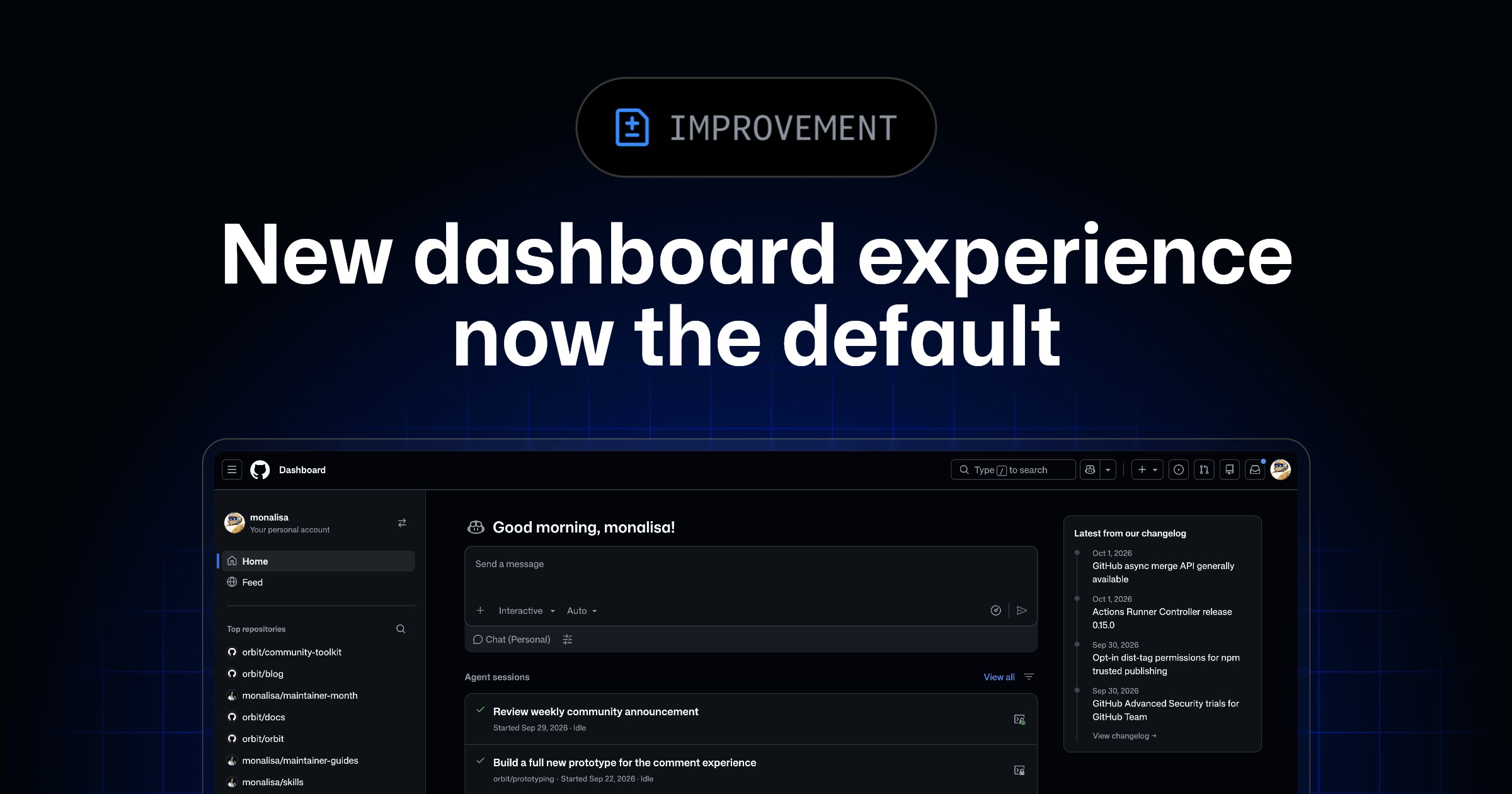
進行中のエージェントセッション、Issue、プルリクエストを1カ所で確認できる。複数の作業対象を同じ画面にまとめることで、現在動いているセッションと、対応すべきIssueやプルリクエストを行き来せずに把握できる構成だ。
各セクションにはフィルターを設定でき、一覧に何を表示するかを選択できる。各リストに表示できる項目は最大12件で、確認したい対象に絞って優先度を整理しやすくなっている。
Feedタブ
更新情報は独立したFeedタブで確認する。更新を追うためのフィードと、生産性を重視したダッシュボードを分ける設計により、作業対象の確認と情報のキャッチアップが別々の場所に整理される。
Copilotで開始
ダッシュボードから作業を直接始めることもできる。たとえば、IssueをCopilot coding agentに割り当てたり、Copilot Chatでプルリクエストを開いたりできるため、対象を確認した後、その画面を起点に次の操作へ進める。
以前の体験を使いたい場合は、「Preview」の隣にあるドロップダウンをクリックし、いつでも切り替えられる。新しいダッシュボード体験については、利用者からの意見も求められている。
The new dashboard experience
GitHub’s redesigned dashboard is now the default view for everyone, after previously being available as a feature preview. The change matters because it brings active work together while separating updates from the dashboard’s productivity-focused view.
The dashboard is designed to help users focus on the work that matters most. It also aims to make it easier to find and act on whatever needs attention next.
Active agent sessions
The new default view shows active agent sessions, issues, and pull requests in one place. This gives users a single dashboard for reviewing these different types of ongoing work rather than presenting them separately.
Each section can be adjusted with filters that determine what appears there. Individual lists can display up to 12 items, allowing the dashboard’s contents to be tailored around the work a user wants to see.
Separate Feed tab
Updates are available through a separate Feed tab. This keeps the feed distinct from the main dashboard, which is focused on productivity and current work.
The separation means the dashboard can emphasize active agent sessions, issues, and pull requests, while the Feed tab provides a dedicated place to catch up on updates. Filters further control the items shown in each dashboard section.
Start work directly
Users can begin work from the dashboard itself. Available actions include assigning an issue to Copilot coding agent and opening a pull request in Copilot Chat.
The previous dashboard experience remains available for users who prefer it. They can switch back at any time by clicking the dropdown next to “Preview.” GitHub is also asking users to share their thoughts on the new dashboard experience.
ポコとTECHガイドPoko & TECH Guide
ポコと当サイトのTECHガイドが、記事の要約と収集した情報から読みどころを語るAI生成の対話です。Poko and TECH Dashboard's own TECH Guide discuss the article's highlights in an AI-generated conversation based on its summary and collected source details.
- ポコPoko進行中のエージェントセッションとIssue、プルリクエストが、同じ画面に並ぶの?Do active agent sessions, issues, and pull requests all show up on the same screen now?
- TECHガイドTECH Guideうん。新しい標準ダッシュボードでは、その3つを一か所で確認して、次に必要な作業を見つけやすくしているよ。Yes. The new default dashboard brings all three together, making it easier to find what needs your attention next.
- ポコPokoじゃあ、開発者が次にやることを整理して、作業を始めやすくなるんだね?So it helps developers sort out what to do next and get started?
- TECHガイドTECH Guideそうだね。各一覧はフィルターで最大12件にでき、更新は別のFeedタブで確認できる。Copilotへの作業依頼も画面から始められるよ。Right. Filters can limit each list to 12 items, updates live in a separate Feed tab, and developers can start Copilot tasks from the dashboard.
- ポコPoko作業と更新を分けつつ、必要なものを一か所で見られるから、次の一手に集中しやすいんだ。Got it—the dashboard separates updates from work while keeping key tasks together, so the next step is easier to focus on.
- TECHガイドTECH Guideただ、新しい表示が合わない場合は、「Preview」の横にあるドロップダウンから以前の表示へいつでも戻せるよ。One note: if the new layout isn’t a good fit, you can switch back anytime from the dropdown next to “Preview.”