リポジトリ概要画面でアクセシビリティ声明が強調表示にAccessibility statements highlighted on repository overview
匿名の公開いいねです。記事の保存・お気に入りではなく、Featured、Top 3、重要度、掲載順位には影響しません。仕組みとプライバシーAnonymous public likes are reactions, not saved articles or bookmarks. They do not affect Featured, Top 3, importance, or listing order.How it works and privacy
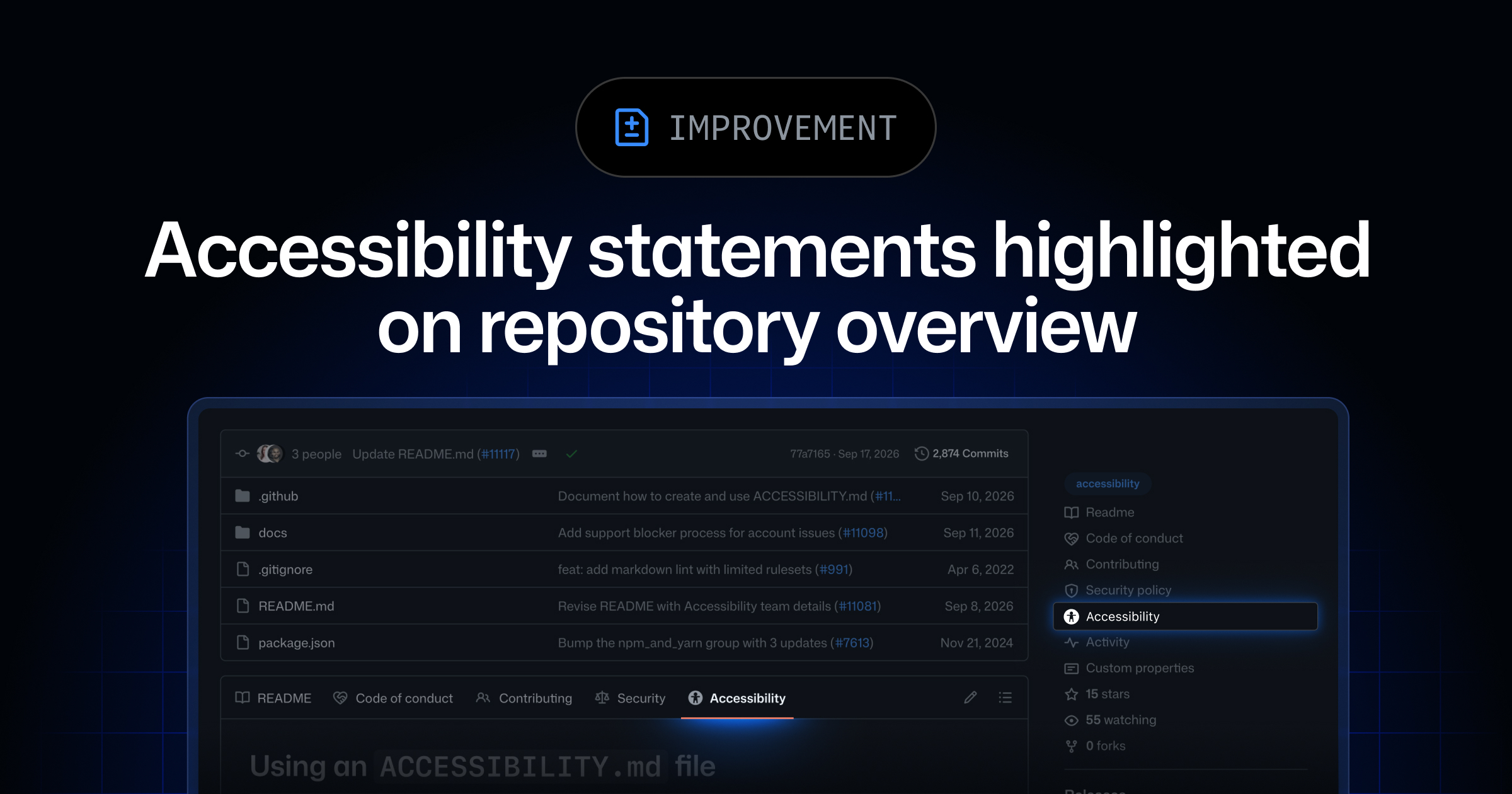
- GitHubはリポジトリのルート、.github、docsのいずれかに置かれたACCESSIBILITY.mdファイルをリポジトリ概要画面で強調表示するようにし、Community Standardsページから声明の追加・提案も可能にした。
- github.comの全プランで利用でき、GitHub Enterprise Server 3.24でも提供予定で、利用者はアクセシビリティ対応状況を一目で確認できる。
- GitHub now highlights an ACCESSIBILITY.md file found in a repository's root, .github, or docs directory directly on the repository overview, and lets maintainers add or propose such a statement via the Community Standards page.
- Available on all github.com plans and coming to GitHub Enterprise Server 3.24, this helps users quickly assess a project's accessibility commitments.
本ページの本文と要約は AI による自動生成です。日本語版と英語版は言語ごとに独立して生成されるため、表現や詳しさが異なる場合があります。正確性は元記事 (github.blog) をご確認ください。The body and summaries are AI-generated independently for each language, so wording and detail may differ. Verify accuracy at the original source (github.blog).
要約と収集メタデータに基づく AI 解説。元記事全文の転載・翻訳ではありません。AI explainer based on the summaries and collected metadata, not a copy or translation of the full source article.
強調表示
GitHubは、アクセシビリティ声明を記載するACCESSIBILITY.mdをリポジトリ概要画面で強調表示する機能を提供する。利用者がリポジトリのアクセシビリティ対応状況を確認しやすくなる改善だ。
対象ディレクトリ
強調表示の対象となるのは、リポジトリのルート、.githubディレクトリ、docsディレクトリのいずれかに配置されたACCESSIBILITY.mdだ。これらの場所にファイルがある場合、リポジトリ概要画面からアクセシビリティ声明を見つけられる。声明を確認するために、利用者が各ディレクトリを個別に探す必要がなくなる。
声明の追加
公開リポジトリでは、Community Standardsページからアクセシビリティ声明を追加できるほか、声明の追加を提案することも可能になった。既存のACCESSIBILITY.mdを概要画面に表示するだけでなく、Community Standardsページを通じて声明を用意するための操作にも対応している。
全プランで提供
この改善は、github.comの全GitHubプランで利用できる。GitHub Enterprise Serverについては、バージョン3.24で提供される予定だ。配置場所とファイル名が明確に定められ、概要画面とCommunity Standardsページの双方からアクセシビリティ声明を扱えるようになった。
Repository overview
GitHub now highlights a repository’s accessibility statement directly on the repository overview. The change matters because it helps users quickly assess a project’s accessibility commitments without first navigating through its directories.
The highlighted statement is provided through a file named ACCESSIBILITY.md. When GitHub finds that file in one of the supported locations, it makes the file visible from the repository overview.
ACCESSIBILITY.md file
GitHub looks for ACCESSIBILITY.md in three locations: the repository’s root, the .github directory, or the docs directory. Placing the file in any of these locations allows it to be highlighted on the overview screen.
This gives repositories flexibility over where they keep the statement. A project can place it alongside root-level repository files or within directories already used for repository or documentation material, while receiving the same overview treatment.
Community Standards page
An accessibility statement can also be added or proposed from a public repository’s Community Standards page. This provides a second way to work with the statement beyond creating ACCESSIBILITY.md directly in one of the supported directories.
Together, the overview highlighting and Community Standards option make the statement easier to surface and manage. The repository overview presents the statement to users, while the Community Standards page supports adding or proposing one for a public repository.
All GitHub plans
The improvement is available on all GitHub plans on github.com. It is also planned for GitHub Enterprise Server 3.24.
GitHub provides further information in its documentation about adding an accessibility page to a repository.
ポコとTECHガイドPoko & TECH Guide
ポコと当サイトのTECHガイドが、記事の要約と収集した情報から読みどころを語るAI生成の対話です。Poko and TECH Dashboard's own TECH Guide discuss the article's highlights in an AI-generated conversation based on its summary and collected source details.
- ポコPokoACCESSIBILITY.mdが概要画面で目立つようになったの? どこに置けば表示されるんだろう。Is ACCESSIBILITY.md now highlighted on the repository overview? Where does it need to be placed?
- TECHガイドTECH Guideリポジトリのルート、.github、docsのどれかに置くと、概要画面で強調表示されるよ。Yes. Place it in the repository root, .github, or docs directory, and it will be highlighted on the overview.
- ポコPokoプロジェクトを見る人が、アクセシビリティへの対応をすぐ確かめやすくなるってこと?So people viewing a project can check its accessibility commitments more quickly?
- TECHガイドTECH Guideうん。利用者は対応状況を一目で確認しやすくなり、メンテナーは公開リポジトリのCommunity Standardsページから声明を追加・提案できるよ。Right. Users can assess that at a glance, while maintainers can add or propose a statement from a public repository’s Community Standards page.
- ポコPoko声明を決まった場所に置けば、探し回らずに概要画面から見つけられるんだね。Got it—the statement becomes easier to find from the overview when it’s stored in one of those locations.
- TECHガイドTECH Guideただし、github.comでは全プランで利用できる一方、GitHub Enterprise Serverは3.24で提供予定だよ。One note: it’s available on all github.com plans, while GitHub Enterprise Server support is planned for version 3.24.