個人リポジトリのコメントからユーザーをブロック可能にBlock users from comments in personal repositories
匿名の公開いいねです。記事の保存・お気に入りではなく、Featured、Top 3、重要度、掲載順位には影響しません。仕組みとプライバシーAnonymous public likes are reactions, not saved articles or bookmarks. They do not affect Featured, Top 3, importance, or listing order.How it works and privacy
- 個人アカウントが所有するリポジトリのIssueやPRコメントから、直接ユーザーをブロック・解除できるようになった。
- 不要なやり取りを素早く遮断できる。
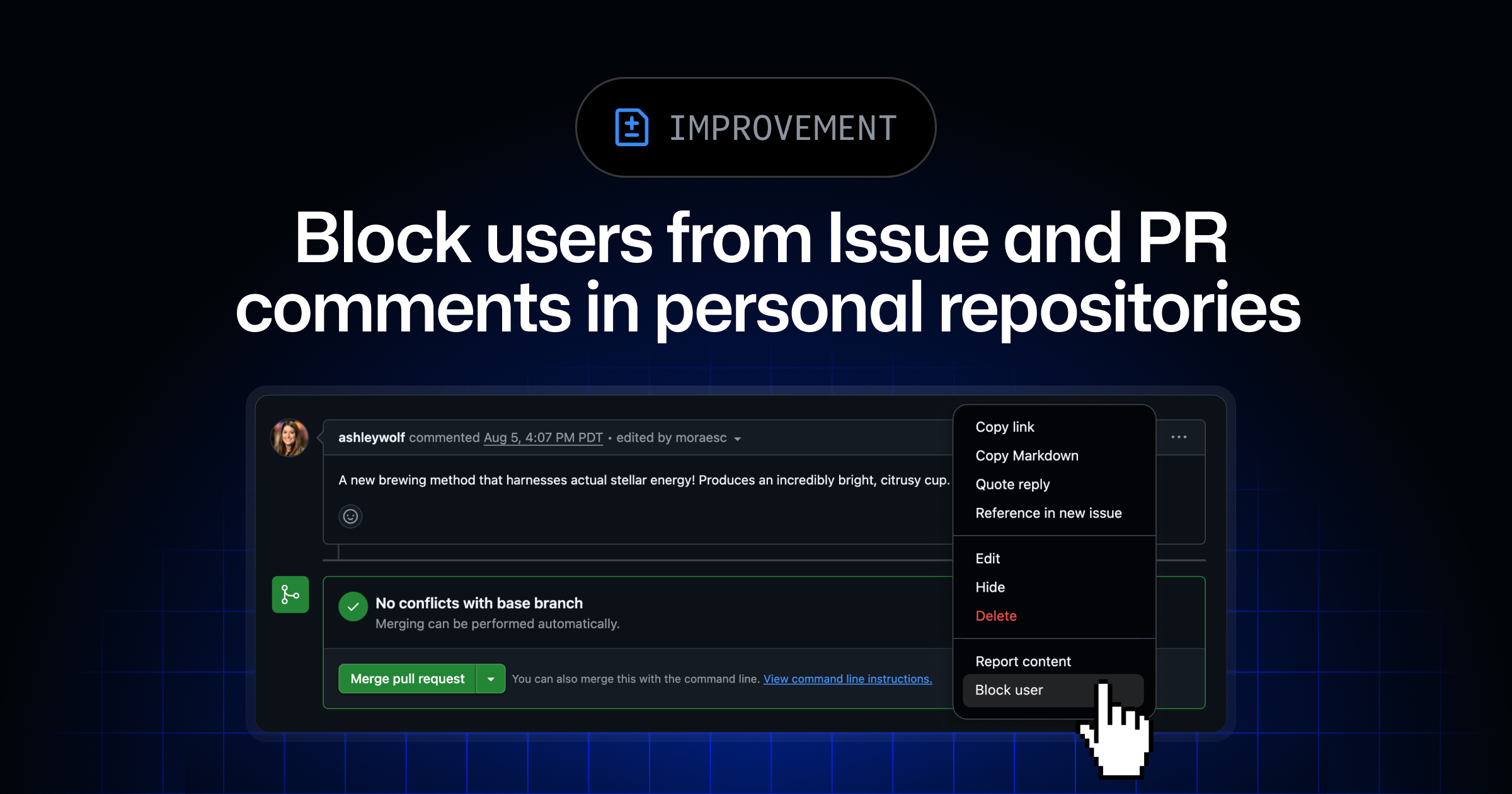
GitHub now lets personal account repository owners block or unblock users directly from issue and pull request comments, making it easier to manage unwanted interactions.
要約と収集メタデータをもとに生成した AI 解説本文です。元記事全文の転載・翻訳ではありません。This AI explainer is generated from the summaries and collected metadata, not from a reproduction or translation of the full source article.
GitHubは、個人アカウントが所有するリポジトリのIssueやプルリクエスト(PR)のコメント欄から、直接ユーザーをブロックまたは解除できる機能を追加した。不要なやり取りをその場で素早く遮断できるようになり、リポジトリ運営者のモデレーション負担を軽減する狙いがあると見られる。
新機能では、Issueやプルリクエストに投稿されたコメントを起点に、対象ユーザーのブロックや解除を実行できる。これまでもGitHubにはユーザーをブロックする仕組みが用意されていたが、コメント上の操作から直接手続きに入れるようになった点が今回の変更のポイントで、問題のあるやり取りへ対処するまでの手数が減ることが期待される。
対象は「個人GitHubアカウントが所有するリポジトリ」とされている。GitHubのアカウントには個人アカウントと組織(Organization)アカウントがあり、今回の告知は前者を対象としたものだ。
個人アカウントが所有するリポジトリのIssueやPRコメントから、直接ユーザーをブロック・解除できるようになった。
オープンソース開発の現場では、公開リポジトリにさまざまな利用者からコメントが寄せられるため、悪意ある投稿や執拗なやり取りへの対応が課題になりやすい。GitHubはこれまでもIssueのロックや会話の制限、コミュニティ向けの行動規範(Code of Conduct)テンプレートなど、複数のモデレーション関連機能を提供してきた。今回の追加は、そうしたツール群を補完し、個人開発者が自身のプロジェクトを守りやすくする位置づけといえる。
同種の課題はコード共有・コラボレーションを扱う他サービスでも共通しており、各プラットフォームが通報やブロック、コメント制限といった機能を整備してきた経緯がある。今回のGitHubの対応も、コメント単位での即応性を高める実務的な改善と受け止められる。具体的な操作手順や適用範囲の詳細については、同社の開発者向けブログ「The GitHub Blog」の告知で確認できる。
GitHub has added a way for people who own repositories under personal accounts to block or unblock other users straight from the comment threads on pull requests and issues. According to the company's changelog, the option now sits alongside individual comments in those threads, giving maintainers a faster path to shut down unwanted or disruptive exchanges as they happen.
The workflow matters because moderating a project has historically meant breaking your concentration. To block someone, a repository owner typically had to open the offending user's profile page or dig into account settings, confirm the action, and only afterward return to the discussion. By surfacing block and unblock controls at the point of the comment itself, GitHub reduces that friction and lets an owner respond to spam, harassment, or off-topic noise without navigating away.
Blocking on GitHub is an established account-level feature rather than a new concept. When a personal account blocks another user, that person is generally prevented from interacting with the blocker's content, including commenting, opening issues or pull requests, and adding reactions. The change described in the changelog appears to be about where and how the action can be triggered, rather than altering what blocking does once it takes effect. The ability to unblock from the same place is a useful complement, since moderation decisions are sometimes reversed.
It is worth noting the distinction between personal repositories and those owned by organizations. Organization owners and moderators have had a broader set of moderation controls for some time, including the ability to block users at the organization level. Bringing comment-level blocking to repositories owned by personal accounts helps narrow that gap, giving solo maintainers and small projects tooling closer to what larger teams already use. That is meaningful because a large share of open source work is carried out by individuals maintaining projects under their own usernames rather than under an organization.
Comment-level blocking fits into a wider collection of moderation features GitHub has built over the years. Maintainers can already lock conversations to stop further replies, hide individual comments while keeping them on the record, set temporary interaction limits that restrict who can comment during a heated period, and report abusive behavior to GitHub itself. Repositories can also publish a code of conduct and contributing guidelines to set expectations up front. Blocking from a comment slots in as another lightweight, immediate tool rather than a replacement for those heavier measures.
The context here is the ongoing challenge of harassment and spam in public software development. Open source maintainers, many of whom volunteer their time, are frequent targets of hostile comments, drive-by demands, and automated spam on their issue trackers. Reducing the number of steps required to remove a bad actor from a thread is a modest quality-of-life improvement, but it can matter in the moment when a maintainer is trying to keep a discussion productive. It also lowers the chance that someone abandons a moderation action simply because the process was cumbersome.
For developers who want to try it, the feature is accessed from the comment interface on issues and pull requests within repositories they own under a personal account. The changelog frames the steps as opening the relevant menu on a comment and choosing to block or unblock the author, though the exact controls may vary slightly by interface. As with other changelog entries, GitHub typically rolls such changes out to the web experience first, and the behavior of previously configured blocks is unlikely to change.
The update is incremental rather than transformative, and GitHub has not tied it to any pricing change or premium tier based on the information provided. Still, for the many individuals who run repositories on their own, having block and unblock available inline is a sensible refinement that aligns personal-account moderation more closely with the controls organizations have offered. Maintainers who deal with recurring unwanted interactions are the most likely to feel the benefit, and the addition reflects GitHub's steady, incremental approach to giving repository owners more direct control over the conversations happening on their projects.
本ページの本文と要約は AI による自動生成です。日本語版と英語版は言語ごとに独立して生成されるため、表現や詳しさが異なる場合があります。正確性は元記事 (github.blog) をご確認ください。The body and summaries are AI-generated independently for each language, so wording and detail may differ. Verify accuracy at the original source (github.blog).