エンタープライズ管理設定の製品内バリデーターEnterprise managed settings in-product validator
匿名の公開いいねです。記事の保存・お気に入りではなく、Featured、Top 3、重要度、掲載順位には影響しません。仕組みとプライバシーAnonymous public likes are reactions, not saved articles or bookmarks. They do not affect Featured, Top 3, importance, or listing order.How it works and privacy
- GitHub Copilotにエンタープライズ管理設定の製品内バリデーターが追加され、JSONの形式不備、未対応の構成、無効なチーム対応付けを検出します。
- 対象ファイルとJSONパスも示され、管理者はポリシー適用を妨げる問題を修正できます。
GitHub Copilot now validates enterprise-managed settings within the product, flagging malformed JSON, unrecognized options, and bad team mappings so admins can enforce policies reliably.
本ページの本文と要約は AI による自動生成です。日本語版と英語版は言語ごとに独立して生成されるため、表現や詳しさが異なる場合があります。正確性は元記事 (github.blog) をご確認ください。The body and summaries are AI-generated independently for each language, so wording and detail may differ. Verify accuracy at the original source (github.blog).
要約と収集メタデータに基づく AI 解説。元記事全文の転載・翻訳ではありません。AI explainer based on the summaries and collected metadata, not a copy or translation of the full source article.
製品内バリデーター
GitHub Copilotに、エンタープライズ管理設定を製品内で検証するバリデーターが追加された。ポリシーの適用を妨げる設定上の問題を検出し、意図したとおりに適用できるよう修正箇所を示す機能だ。
検出する問題
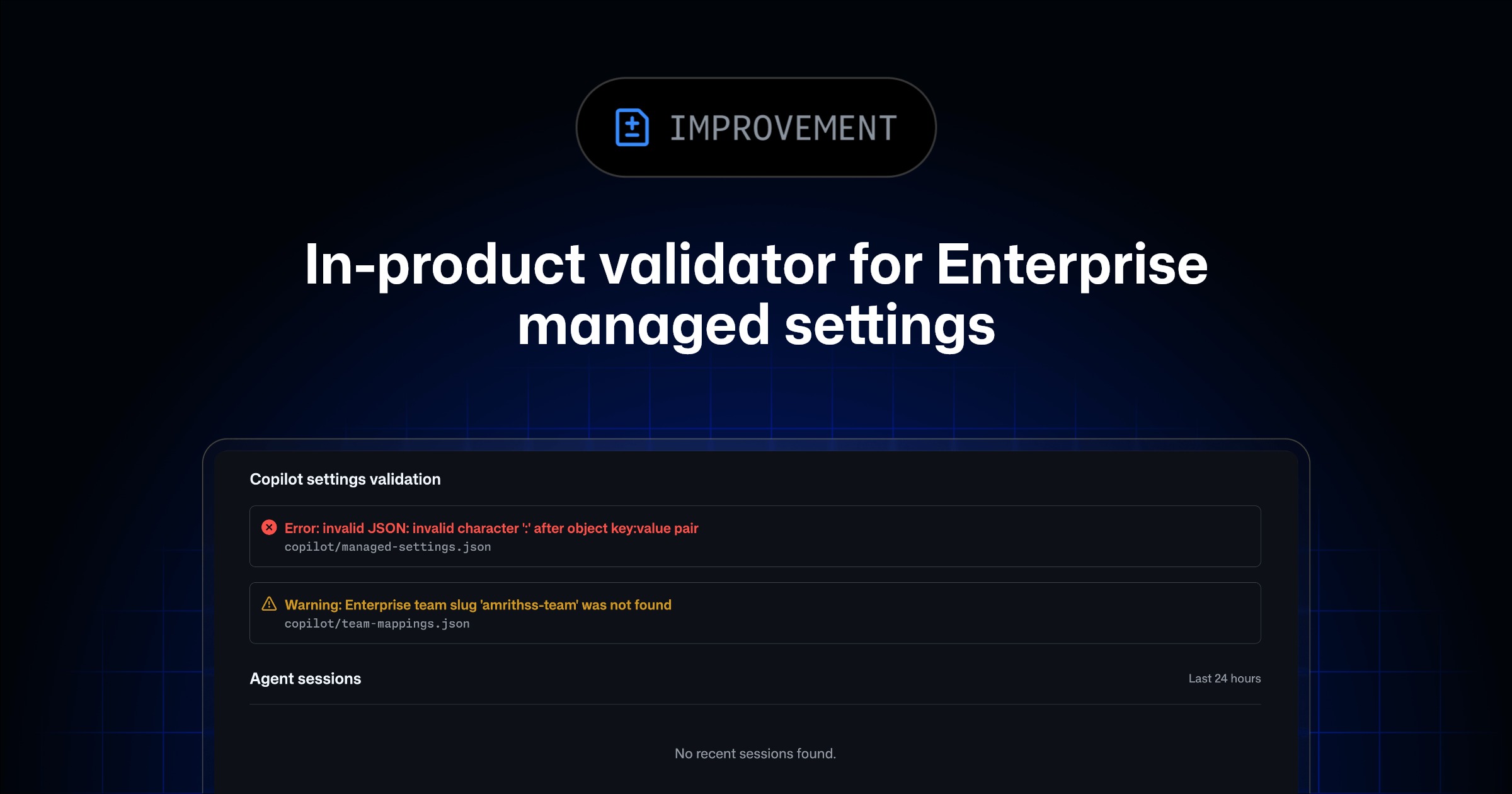
バリデーターは、形式が正しくないJSON、サポートされていない構成、無効なチーム対応付けなどのエラーを検出する。これらは、エンタープライズで管理するポリシーが適切に適用されない原因になり得る。管理者は、エンタープライズAIコントロールページにある「Copilot settings validation」セクションで問題を確認し、修正できる。
ファイルとJSONパス
検出された各問題には、影響を受けるファイルとJSONパスが表示される。対象には「copilot/team-mappings.json」と、チーム対応付けファイルから参照されるチーム設定ファイルが含まれる。ファイル名だけでなくJSON内の該当箇所も特定されるため、ポリシー適用を阻害している設定を確認できる。
修正結果の確認
問題を修正した後は、変更を「.github-private」リポジトリのデフォルトブランチへコミットする。そのうえでAgentsページを再読み込みし、バリデーターの結果を改めて確認する。検出内容が解消され、構成が有効になっていることを確認するまでが修正の手順となる。
Enterprise managed settings
GitHub Copilot now provides an in-product validator for enterprise managed settings. It matters because configuration errors can prevent policies from being enforced as intended, and the validator helps administrators identify and correct those problems within the product.
The validator detects malformed JSON, unsupported configurations, invalid team mappings, and other errors that can interfere with policy enforcement. This gives administrators a way to check managed settings and locate configuration issues before confirming that the intended policies are valid.
Copilot settings validation
Validation results appear in the “Copilot settings validation” section of the enterprise AI controls page. Administrators can review the reported errors there and use the supplied details to make corrections.
Each issue identifies both the affected file and the relevant JSON path. These details narrow the reported problem to a particular location in the configuration, helping administrators determine where a correction must be made rather than only indicating that the overall configuration is invalid.
Team mappings files
The validator covers copilot/team-mappings.json and any team settings files referenced by the team mappings file. It can flag invalid team mappings alongside malformed JSON and unsupported configuration choices.
By identifying the affected file and JSON path for each issue, the validator connects a policy-enforcement problem to the configuration entry that needs attention. Administrators can then review the relevant mapping or team settings file and correct the reported error.
Correcting an issue
After fixing an issue, commit the change to the default branch of the .github-private repository. Then reload the Agents page and review the validator results again.
This follow-up validation confirms whether the corrected configuration is valid. If the validator no longer reports the issue, administrators can verify that the managed settings are configured so the policies can be enforced as intended.
ポコとTECHガイドPoko & TECH Guide
ポコと当サイトのTECHガイドが、記事の要約と収集した情報から読みどころを語るAI生成の対話です。Poko and TECH Dashboard's own TECH Guide discuss the article's highlights in an AI-generated conversation based on its summary and collected source details.
- ポコPokoGitHub Copilotの製品内バリデーターって、設定のどんなミスを見つけてくれるの?What kinds of settings mistakes can GitHub Copilot’s in-product validator catch?
- TECHガイドTECH Guideこの記事では、壊れたJSON形式や未対応の構成、無効なチーム対応付けなどを検出するんじゃ。問題のファイルとJSON内の場所も示すぞい。The article says it flags malformed JSON, unsupported configurations, invalid team mappings, and similar errors. It also points admins to the affected file and location within the JSON.
- ポコPoko設定に赤ペンを入れてくれる感じかな? 管理者が、ポリシーを止めているミスを探しやすくなるんだね。So it’s like a red pen for settings? That should help admins find mistakes that are blocking policies.
- TECHガイドTECH Guideそういう捉え方じゃな。説明されている範囲では、管理者が問題を直し、ポリシーを意図どおり適用しやすくするための機能じゃよ。That’s a fair way to see it. As described, it helps admins correct problems so policies can be enforced as intended.
- ポコPokoつまり、設定ミスの場所まで教えてくれるから、管理者が迷わず直しやすいんだ!Got it—the validator shows where the settings error is, making it easier for admins to fix it!
- TECHガイドTECH Guideただし、修正後は.github-privateリポジトリのデフォルトブランチへコミットし、Agentsページを再読み込みして結果を確認する流れじゃ。One important step remains: after fixing the issue, commit to the default branch of the .github-private repository, reload the Agents page, and check the validator results.





