Copilot BusinessおよびEnterpriseでCopilot機能を既定で有効化Default Enablement of Copilot features for Copilot Business and Enterprise
匿名の公開いいねです。記事の保存・お気に入りではなく、Featured、Top 3、重要度、掲載順位には影響しません。仕組みとプライバシーAnonymous public likes are reactions, not saved articles or bookmarks. They do not affect Featured, Top 3, importance, or listing order.How it works and privacy
- GitHub Copilot BusinessとEnterpriseに、対象機能と対応クライアントを一括管理する新しいグローバル既定ポリシーが追加されました。
- 管理者はアクセスへの反映前に28日間設定でき、組織全体で新機能の展開方針を統一できます。
- GitHub Copilot Business and Enterprise gain a global default for eligible features and clients.
- Admins can configure it for 28 days before access changes, enabling consistent rollouts.
本ページの本文と要約は AI による自動生成です。日本語版と英語版は言語ごとに独立して生成されるため、表現や詳しさが異なる場合があります。正確性は元記事 (github.blog) をご確認ください。The body and summaries are AI-generated independently for each language, so wording and detail may differ. Verify accuracy at the original source (github.blog).
要約と収集メタデータに基づく AI 解説。元記事全文の転載・翻訳ではありません。AI explainer based on the summaries and collected metadata, not a copy or translation of the full source article.
グローバル既定
GitHub Copilot BusinessおよびEnterpriseに、一般提供されている対象機能と、対応するクライアント機能を一括管理する新しいグローバル既定ポリシーが追加された。企業や組織のCopilot設定で、新機能の展開方針を統一するための仕組みとなる。
28日間の設定
新ポリシーは、今後28日間にわたって管理者が設定できる。ただし、この期間中はユーザーの機能アクセスには影響しない。管理者があらかじめ方針を構成してから、アクセスへの反映に備えられる形だ。設定した時点で対象機能の利用可否が直ちに変わるわけではない点が重要となる。
AI Controls
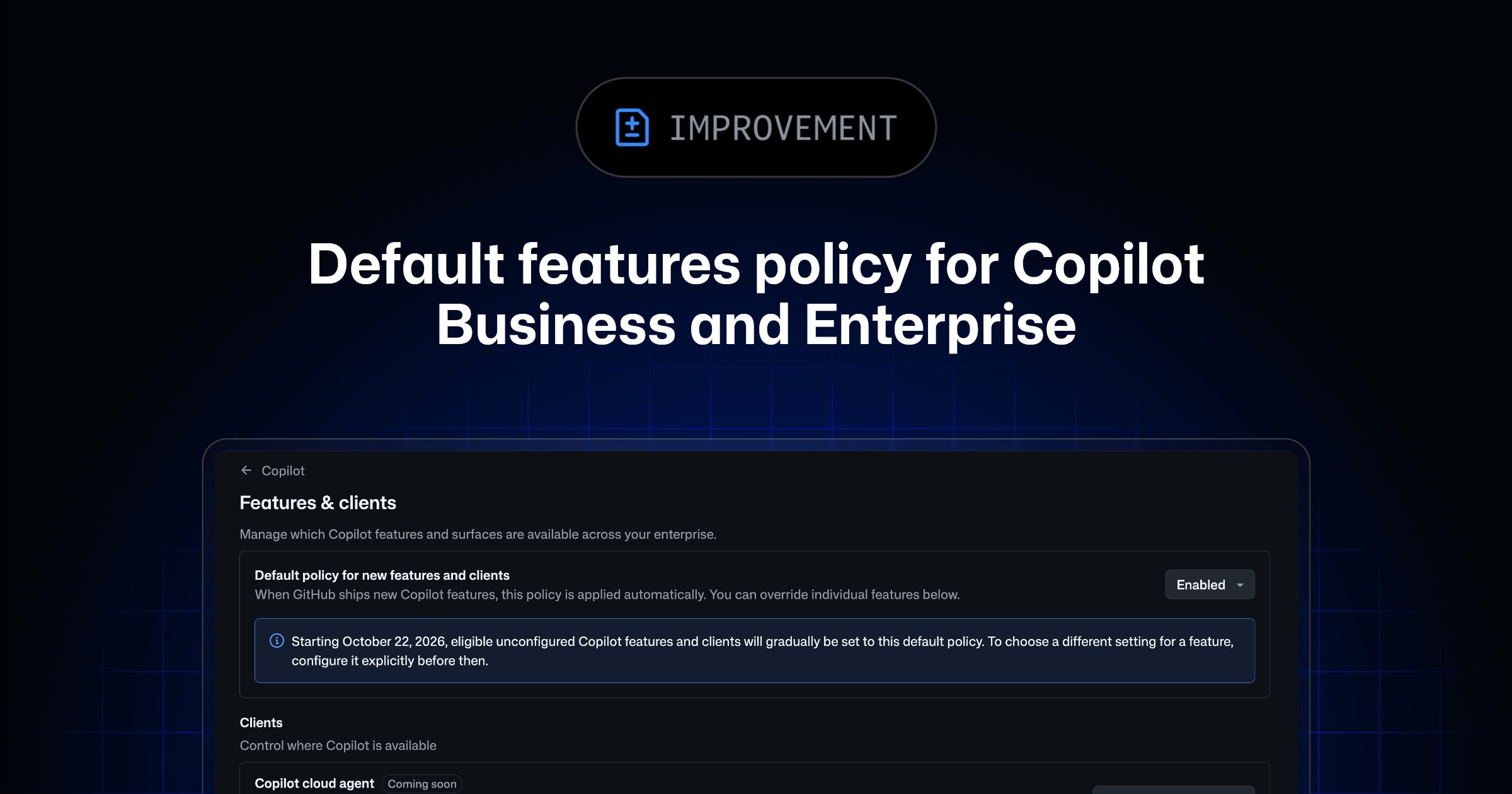
設定は「AI Controls」ページから行う。「Copilot」サブページを開き、「Default policy for new features」に用意された選択肢からポリシーを指定する。これにより、企業または組織のCopilot設定において、対象となる新機能や対応クライアントの既定の扱いをまとめて管理できる。
適用範囲
ポリシーは、企業の「Features & clients」ページで管理される対象機能に適用される。加えて、「Agents」ページにあるCopilot Code Reviewポリシーと、CopilotにおけるMCP serversのポリシーも対象となる。どの機能が対象になるか、また例外がどのように扱われるかについては、default availabilityのドキュメントで確認するよう案内されている。
Global default policy
GitHub Copilot Business and Enterprise are gaining a global default policy for generally available Copilot features and supported client capabilities. The change gives administrators a way to apply a consistent rollout policy across an enterprise or organization rather than managing each eligible new feature separately.
The policy covers eligible features and clients within enterprise and organization Copilot settings. Its scope is determined by feature eligibility and documented exceptions.
AI Controls
Administrators can configure the policy from the “AI Controls” page. From there, they open the “Copilot” subpage and choose an option under “Default policy for new features.”
There is a 28-day configuration period before the policy affects users’ feature access. During that period, administrators can select the desired default, but the setting will not yet change which features users can access. This provides time to establish an organization-wide approach before access changes take effect.
Features & clients
The global default applies to eligible features managed through an enterprise’s “Features & clients” page. That page is available at https://github.com/enterprises/YOUR-ENTERPRISE-SLUG/ai-controls/copilot/features, with the enterprise’s slug used in the URL.
The policy is not limited to entries on that page. It also applies to the Copilot Code Review policy found on the “Agents” page, as well as the policy for MCP servers in Copilot.
Feature eligibility and exceptions
Only eligible features are governed by the new global default. GitHub’s documentation on default availability defines which features qualify and identifies any exceptions.
As a result, the policy provides a shared default for supported Copilot capabilities while retaining eligibility boundaries. Administrators can use the 28-day window to configure that default before it begins controlling feature access for users.
ポコとTECHガイドPoko & TECH Guide
ポコと当サイトのTECHガイドが、記事の要約と収集した情報から読みどころを語るAI生成の対話です。Poko and TECH Dashboard's own TECH Guide discuss the article's highlights in an AI-generated conversation based on its summary and collected source details.
- ポコPoko会社でCopilotを使う人や管理者の普段の仕事は、何が変わるの?What changes day to day for companies using Copilot and the admins managing it?
- TECHガイドTECH Guideこの記事では、対象の新機能や対応クライアントの既定方針を一括設定でき、組織全体の展開をそろえやすくなるのじゃ。The article says admins can set one default policy for eligible new features and supported clients, making organization-wide rollouts more consistent.
- ポコPoko前は一括で決められなかったの? それと、設定したらすぐ全員に反映される?Couldn’t admins manage that all at once before? And does a change affect everyone immediately?
- TECHガイドTECH Guide新しいグローバル既定ポリシーが追加されたことは分かるが、以前の具体的な方法は書かれておらん。設定できる28日間は、まだ利用者のアクセスに影響しないそうじゃ。We know the global default policy is new, but the previous process isn’t described. The post says admins have 28 days to configure it before user access is affected.
- ポコPokoつまり、利用者に影響が出る前に、会社全体の新機能ルールをそろえる準備期間があるのが一番の収穫だね!So the big takeaway is that admins get time to align company-wide rules for new features before users are affected!
- TECHガイドTECH Guideそうじゃな。次は、対象機能と例外を確認しつつ、28日間でどの既定方針を選ぶかに注目じゃよ。Exactly. The next thing to watch is which default admins choose during those 28 days, while checking feature eligibility and exceptions.





