Microsoft Foundryでの開発をワンコマンドで始める「Foundry Dev Pack」を発表Introducing Foundry Dev Pack: One Command to Start Building
匿名の公開いいねです。記事の保存・お気に入りではなく、Featured、Top 3、重要度、掲載順位には影響しません。仕組みとプライバシーAnonymous public likes are reactions, not saved articles or bookmarks. They do not affect Featured, Top 3, importance, or listing order.How it works and privacy
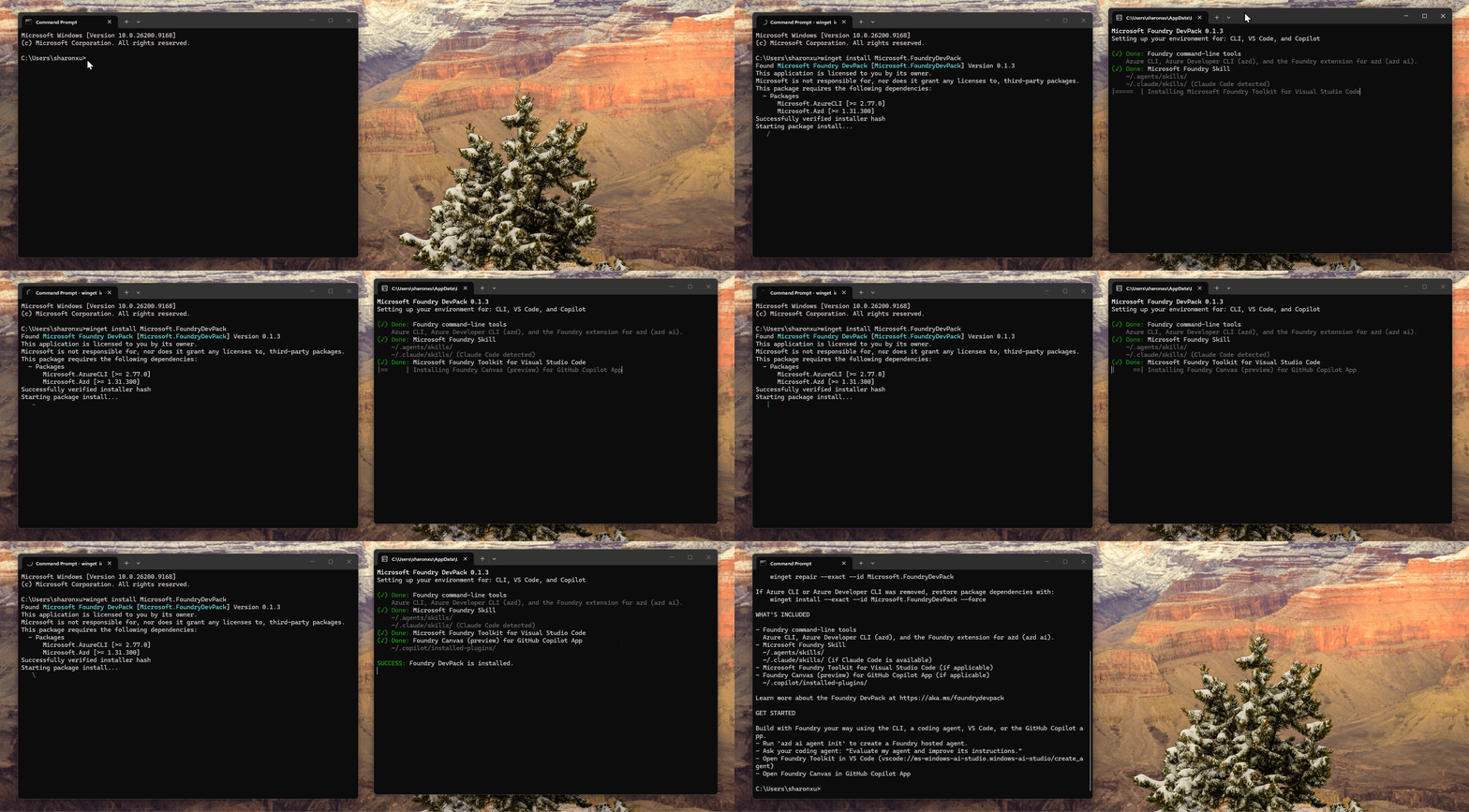
- Foundry Dev Packは、Azure CLI、Azure Developer CLI、Microsoft Foundry Extension for azdを単一のセットアップで導入します。
- 端末やIDE、コーディングエージェントを使う開発者の初期準備を軽減します。
Foundry Dev Pack bundles Azure CLI, Azure Developer CLI, and the Microsoft Foundry Extension for azd into one setup, reducing preparation for developers across terminals, IDEs, and coding agents.
本ページの本文と要約は AI による自動生成です。日本語版と英語版は言語ごとに独立して生成されるため、表現や詳しさが異なる場合があります。正確性は元記事 (devblogs.microsoft.com) をご確認ください。The body and summaries are AI-generated independently for each language, so wording and detail may differ. Verify accuracy at the original source (devblogs.microsoft.com).
要約と収集メタデータに基づく AI 解説。元記事全文の転載・翻訳ではありません。AI explainer based on the summaries and collected metadata, not a copy or translation of the full source article.
単一セットアップ
Foundry Dev Packは、Microsoft Foundryでの開発に必要な初期インストールを、ワンコマンドのセットアップにまとめるオールインワンインストーラーだ。端末、IDE、コーディングエージェントを利用する開発者の準備を簡素化し、開発を始めやすくする。
端末からの操作
セットアップには、Azure CLI(az)、Azure Developer CLI(azd)、Microsoft Foundry Extension for azdが含まれる。これらのツールを個別に導入するのではなく、単一のセットアッププロセスでマシンに導入できる。端末からスキャフォールド、デプロイ、評価、自動化を行うための環境が整えられる。
VS Code
VS Codeでは、エディター上からビルド、テスト、評価、デプロイを実行できる。この機能は、セットアップ対象のマシンにVS Codeが存在する場合にのみインストールされる。また、コーディングエージェントには、Microsoft Foundryのワークフローで再利用できるガイダンスを与えられる。
ガイド付きキャンバス
GitHub Copilot Appが存在する場合には、ガイド付きキャンバスを利用するための機能もインストールされる。このキャンバスでは、ホステッドエージェントの設計とデプロイを進められる。Foundry Dev Packは、端末だけでなく、エディターやコーディングエージェントを含む開発手段に必要なツールを一つの導入手順に集約している。
One Command to Start Building
Microsoft has introduced Foundry Dev Pack to simplify the initial setup of a Microsoft Foundry development environment. It matters because the pack consolidates tools needed across a terminal, IDE, and coding agents into a single setup process, reducing the preparation required before development begins.
Foundry Dev Pack is described as an all-in-one installer that prepares a machine for Foundry development. Rather than handling the initial installation steps separately, developers can use one setup to install the included tooling and make it available for the supported workflows.
Scaffold, Deploy, Evaluate, Automate
For terminal-based work, the pack includes Azure CLI, identified by the az command; Azure Developer CLI, identified by azd; and the Microsoft Foundry Extension for azd. Together, these tools support scaffolding, deployment, evaluation, and automation from the terminal.
The pack also provides coding agents with reusable guidance for Foundry workflows. This extends the setup beyond command-line tools, covering developers who work through coding agents as well as those who use a terminal.
Build, Test, Evaluate, Deploy
The setup also covers editor-based development in VS Code. From the editor, developers can build, test, evaluate, and deploy. This portion is installed only when VS Code is already present on the machine.
A guided canvas supports designing and deploying hosted agents. That capability is installed only if the GitHub Copilot App is present. Across these workflows, the single setup brings together terminal tooling, reusable guidance for coding agents, and editor-based work. The VS Code portion depends on VS Code being present, while the guided canvas for hosted agents depends on the GitHub Copilot App being present.
ポコとTECHガイドPoko & TECH Guide
ポコと当サイトのTECHガイドが、記事の要約と収集した情報から読みどころを語るAI生成の対話です。Poko and TECH Dashboard's own TECH Guide discuss the article's highlights in an AI-generated conversation based on its summary and collected source details.
- ポコPoko「ワンコマンド」って、開発に必要な道具を一回のセットアップでまとめて入れられるってこと?Does “one command” mean a single setup installs all the tools you need to start developing?
- TECHガイドTECH Guideそうじゃ。この記事では、Azure CLI、Azure Developer CLI、Microsoft Foundry Extension for azdを一括導入する仕組みとしておる。That’s right. The post describes one setup that installs Azure CLI, Azure Developer CLI, and the Microsoft Foundry Extension for azd together.
- ポコPokoつまり、引っ越し前に工具箱を一式そろえる感じ?端末やIDEだけでなく、コーディングエージェントにも役立つの?So it’s like getting a full toolbox before moving in? Does it help people using terminals and IDEs, as well as coding agents?
- TECHガイドTECH Guideそのイメージじゃ。説明では、開発者の初期準備を減らし、エージェントには再利用できるFoundry作業ガイドも渡せるとしておる。That’s the idea. The description says it reduces initial prep for developers and can give coding agents reusable guidance for Foundry workflows.
- ポコPokoへえ、最初の道具集めを一回にまとめて、作る・試す・配備する流れへ入りやすくするパックなんだね!Oh, I get it! It bundles the initial tool setup so developers can move into building, testing, and deploying more smoothly.
- TECHガイドTECH Guideただし本文上、VS Code用はVS Codeがある場合だけ、ガイド付きキャンバス用はGitHub Copilot Appがある場合だけ導入されるのじゃ。One caveat in the post: the VS Code part installs only when VS Code is present, and the guided-canvas part only when the GitHub Copilot App is present.





